
.png?width=32&height=32&name=image%20(3).png)
 April 23, 2026
 7 min read
Contents


Key Takeaways:
- The best ecommerce integration software should connect your sales, accounting, inventory, and shipping tools without adding manual work
- Prioritize automation features first, because reducing manual entry saves time and helps prevent costly errors
- Real-time inventory sync is essential if you sell on multiple channels, as it helps avoid overselling and stock mismatches
- Choose software that can scale with your order volume, especially if you expect seasonal spikes or rapid growth
- Before deciding, compare integrations, reporting, and pricing carefully so you pick a tool that fits both your current needs and future goals
Ecommerce integration software simplifies online business operations by connecting systems like marketplaces, ecommerce platforms, payment gateways, shipping providers, and inventory tools, improving efficiency and customer experience. As of March 2026, there are 25.1 million ecommerce stores online (Source), showcasing the massive scale and competition within the industry.
To stay ahead of their competitors, businesses need tools that offer more than basic functionality. Ecommerce integration platforms thus provide multi-channel selling, real-time inventory syncing, and advanced analytics to streamline workflows and enhance personalized shopping experiences.
This article highlights some of the best ecommerce integration options to help businesses thrive in this dynamic environment.
What features to look at when choosing the best ecommerce integration software
When selecting the best ecommerce integration software, several things must be considered to ensure that the solution aligns with your business needs, scalability, and efficiency. Here are some key features to look for:
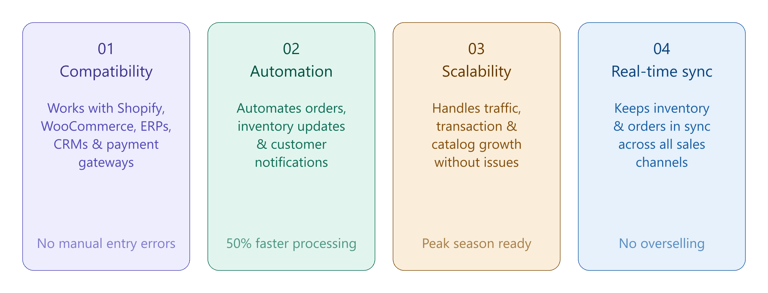
1. Compatibility with existing platforms
Many businesses struggle with the inefficiency and complexity of managing disconnected systems. Compatibility ensures that the integration software works seamlessly with your existing ecommerce platforms (e.g., Shopify, WooCommerce, Magento, BigCommerce), Customer Relationship Management (CRM), Enterprise Resource Planning (ERP), payment gateways, and shipping providers.
A retailer using Shopify for their online store and QuickBooks for accounting can use integration software to transfer sales data into QuickBooks automatically. This eliminates the need for manual entry, reduces errors, and saves time.
2. Automation capabilities
Manual processes, such as order processing, inventory updates, and customer notifications, can lead to delays, errors, and inefficiencies. Automation eliminates repetitive tasks, saving time and reducing the risk of human error.
Businesses implementing automation in ecommerce see an up to 50% reduction in order processing time. This ensures faster operations, improved accuracy, and a better customer experience, allowing businesses to focus on growth and innovation.
3. Scalability
Growing businesses often face limitations with software that cannot handle increased traffic, transactions, or product catalogs. Scalability ensures the software adapts to your business growth without performance issues.
A small business transitioning to a medium-sized enterprise can use scalable integration software to handle a surge in orders during peak seasons, such as holiday sales, without system crashes or slowdowns.
4. Real-time data synchronization
Data discrepancies, such as mismatched inventory levels or outdated order statuses, can lead to customer dissatisfaction and lost sales. Real-time synchronization keeps data consistent across all platforms.
A business selling on multiple channels, like Amazon and eBay, can use real-time synchronization to update inventory levels instantly. This prevents overselling or underselling.
Top 7 ecommerce integrations: A quick overview
|
Name |
Features |
Pricing |
|
Webgility |
- Multichannel selling (Shopify, WooCommerce, Magento, etc.) - Accounting automation with QuickBooks - Real-time inventory management - Comprehensive analytics - Shipping integrations |
Starts at $24/month Annual plans: - $24 Basic (Online) - $79 Pro (Online) - $149 Plus (Desktop) - $199 Advanced (Desktop) - $399 Premium (Desktop) |
|
A2X |
- Integrates with Amazon, Shopify, eBay, and Etsy - Automates sales data reconciliation - Generates detailed financial reports |
Starts at $29/month (no annual discount) Plans (Shopify): - $29 Mini (200 orders), - $45 Basic (500 orders), - $79 Professional (1,000 orders) - $115 Premium (5K orders) |
|
Synder |
- Connects with over 10 ecommerce/payment platforms - Syncs transactions into QuickBooks and Xero - Multi-currency support - Financial insights |
Starts at $65/month Annual plans: - $52 Medium (500 orders) - $92 Scale (1K orders),\ - $220 Large (10K orders) |
|
MyWorks |
- Syncs orders, sales, and statuses - Advanced mapping for customers, products, and payments - Multi-currency support - Shopify & WooCommerce integration |
Free Launch plan (up to 20 orders/month) Monthly - $24 Rise (60 orders) - $55 Grow (300 orders), - $99 Scale (1K orders), - $119 Soar (unlimited orders) |
|
Finaloop |
- Automates income, expenses, inventory, and COGS tracking - Tax-ready reports - Multi-currency support - Real-time financial insights |
Starts at $155/month for businesses with up to $500k revenue |
|
Dext |
- Automates data extraction from receipts and invoices - Integrates with QuickBooks, Xero, Sage - Converts data for easy reporting |
- $19/month (Starter - 200 orders) - $59/month (Growth - 1,000 orders) |
Best ecommerce integration software
Choosing the right ecommerce integration software is crucial for streamlining business operations, enhancing customer experience, and driving growth. With so many options available, selecting the best one can be overwhelming.
To help you make an informed decision, we’ve carefully evaluated and compiled a list of the 7 best ecommerce integration software tools.
1. Webgility
Webgility is a leading ecommerce integration software. It is designed to streamline online selling and automate accounting processes, particularly for users of QuickBooks Online & Desktop.
In other words, the platform connects various ecommerce channels, including popular marketplaces like Amazon and eBay, to QuickBooks. In doing this, it enables businesses to manage their sales, inventory, and financial data from a single interface.
Key features
- Multi-channel selling: Integrates with major marketplaces (Amazon, Walmart, Etsy), ecommerce platforms (Shopify, BigCommerce, WooCommerce, Magento), and POS systems (Lightspeed, Square, Clover)
- Accounting automation: Automatically syncs order and financial data into QuickBooks, eliminating manual bookkeeping
- Real-time inventory management: Updates inventory counts instantly across all sales channels with every sale
- Comprehensive analytics: Provides detailed sales, profitability, and cash flow reports through an intuitive dashboard
- Shipping integrations: Supports major carriers like UPS and FedEx for managing logistics directly within the platform
Pros
- Automates tedious accounting tasks
- Supports multiple ecommerce platforms
- Real-time inventory tracking
- Comprehensive analytics for better decision-making
Cons
- Requires a subscription for full functionality
- Limited features for non-ecommerce businesses
User testimonial
|
“Webgility is an effortless software to operate. Its features are a boon, mainly when importing orders from multiple marketplaces into Quickbooks. The most significant advantage is that it eliminates the need for manual invoice entry. Customer support is unparalleled and is always available to answer queries or concerns. Additionally, the program can be customized to align with your personal preferences. If you sell packs on Amazon, this tool streamlines invoicing. We use this daily to import orders into invoices, saving us much time. —Griselda G., business owner (Source: G2) |
2. A2X
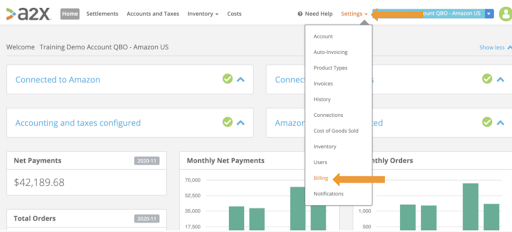
A2X is a leading ecommerce integration software for sellers primarily on marketplaces such as Amazon, eBay, and Etsy, as well as Shopify. It automates the reconciliation of sales data with accounting systems such as QuickBooks and Xero, transforming uncategorized transaction data into organized summaries that facilitate accurate bookkeeping.
Key features
- Integrates with up to six sales platforms, streamlining data management across various accounts
- Automatically categorizes sales, fees, and taxes, significantly reducing manual entry and errors
- Generates detailed reports on profit margins, inventory costs, and channel performance
Pros
- Reduces accounting workload by automating data entry and reconciliation
- Provides reliable financial insights, enhancing decision-making capabilities
- Suitable for businesses of all sizes with flexible pricing tiers
Cons
- It only supports 4 marketplaces and Shopify as they provide summarized payouts—no support for other ecommerce, payment, or Point of Sale (POS) systems.
3. Synder
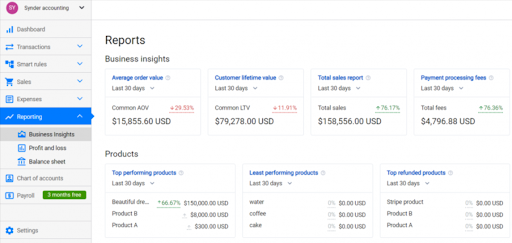
Synder is an accounting automation tool for retailers, SaaS companies, and accountants. It integrates with QuickBooks, Xero, and Sage Intact, offering lightweight accounting, reconciliation, and analytics for Stripe. Synder simplifies ecommerce accounting by automatically syncing transactions, reconciling data, and generating reports across multiple sales channels.
It supports numerous integrations, including payment gateways, and is trusted by companies like Decimal, Totally Booked, and Syndic8. Ideal for small merchants, retailers, brands, and SaaS businesses.
Key features
- Imports transactions directly into accounting software like QuickBooks and Xero
- Offers insights into sales performance and financial trends
- Generates and syncs invoices to track cash flow efficiently
- Supports multi-currency transactions with automatic conversion
Pros
- Saves time by automating data entry and reconciliation
- Reduces errors in financial records
- Provides comprehensive financial visibility and reporting
Cons
- There is no POS integration available
- Pricing may be a consideration for smaller businesses
4. MyWorks
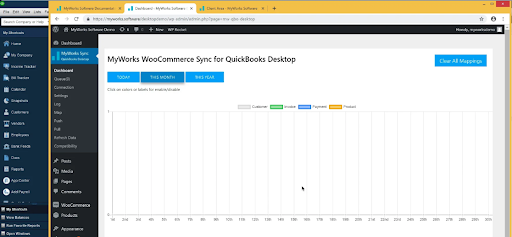
MyWorks is an integration software designed to automate accounting for ecommerce businesses by syncing data between online store Shopify and accounting platforms. Embedded directly in the Shopify admin, it offers a seamless connection but supports only this single store.
It primarily integrates with Shopify and WooCommerce, serving small ecommerce sellers like Haley Nutrition and Hazmat Resource.
Key features
- MyWorks Syncs customer orders, sales, and order statuses across platforms
- It supports advanced mapping for customers, products, and payment gateways like PayPal
- Comprehensive support is available via phone, email, and live chat
- It handles multiple currencies, making it ideal for global businesses that operate in various markets
Pros
- Reduces manual bookkeeping tasks, allowing business owners to focus on growth
- Designed to grow with your business, accommodating increased order volumes and additional features
Cons
- The free plan has restrictions on the number of orders synced per month
- It is a single-channel limitation with inadequate reporting capabilities
5. Finaloop
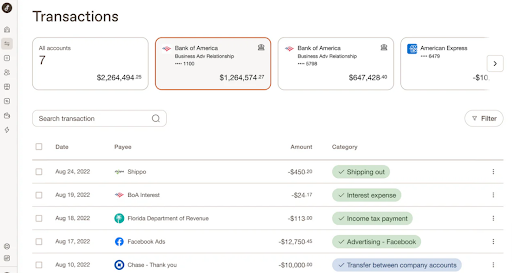
Finaloop is an ecommerce integration software designed to simplify financial management for online sellers. It streamlines bookkeeping and accounting by seamlessly connecting your ecommerce platforms like Shopify, Amazon, and Walmart, as well as payment processors and banks.
Tailored for small to mid-sized businesses, Finaloop automates data entry, reconciliations, and tax reporting, allowing you to focus on growth.
Key features
- Handles income, expenses, inventory, and cost of goods sold (COGS) automatically
- Generates tax-ready reports and ensures compliance with relevant regulations
- Offers a user-friendly interface with real-time insights into your financial health
- Tracks transactions across different currencies, ideal for global sellers
Pros
- Saves time by automating tedious financial tasks
- Accurate and real-time data syncing
- User-friendly with no accounting expertise required
Cons
- Limited offline capabilities
- Delays in support services
- Delay in data sync because it requires human intervention
6. Dext
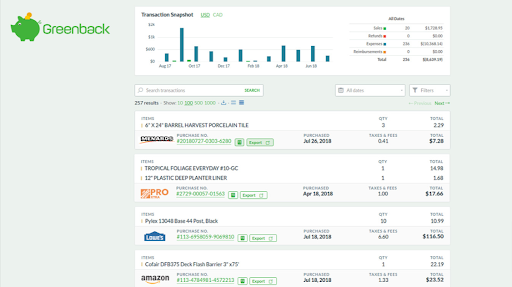
Dext is another ecommerce integration platform for small businesses and ecommerce stores. It helps manage and streamline financial data collection, particularly receipts, invoices, and transactions.
Key features
- Automatically fetches itemized sales, fees, refunds, and reimbursements from multiple ecommerce platforms
- Converts diverse data into a consistent format for easy analysis and reporting
- Seamlessly exports organized data to accounting software such as Xero and QuickBooks
- Provides up-to-date sales information, enabling proactive financial management
Pros
- Streamlines document management by automating data extraction from receipts, invoices, and bank statements
- Integrates with popular accounting platforms like QuickBooks, Xero, and Sage
Cons
- Advanced features are limited to higher-tier plans
- No POS integration and challenges with scalability
Conclusion
Choosing the right ecommerce integration software is crucial for aligning with your business's specific needs, scale, and goals. Tools like Webgility, A2X, and Synder provide seamless integration with multiple platforms, automate accounting tasks, and optimize inventory management, all of which enhance efficiency and minimize errors.
For businesses focused on growth, scalability and real-time synchronization are essential features. Webgility goes beyond sync, giving you complete visibility into your sales, inventory, and finances so you never have to guess what's happening in your business.
With its all-in-one approach, it's the ideal solution for those seeking a comprehensive integration system. Schedule a demo today!
FAQs
What is ecommerce integration?
Ecommerce integration connects systems like online stores, accounting software, ERP, and CRM to enable seamless data exchange, automating processes like inventory sync and order management.
How can I build a business case to justify investing in ecommerce integration software?
Quantify time and cost savings from automation, use profit leak calculators, and highlight benefits like real-time inventory sync, reduced errors, and scalability during peak seasons.
How can I ensure the integration software I choose will grow with my business?
Choose software that supports higher order volumes, multiple sales channels, and advanced features as you scale. Flexible plans and ongoing product updates are also important.
.png?width=56&height=56&name=image%20(3).png) Yvette Zhou
Yvette Zhou


.png?width=24&height=24&name=image%20(1).png) Yash Bodane
Yash Bodane

-3-3.webp)